
Lawyers’ work already happens in AI tools. Now their time entry can too.
Lawyers spend more and more of their day in AI tools such as Copilot, Claude, Harvey and Legora. It isn’t always convenient to open a separate system to write your time.
From today, you don’t have to. Tell your favourite AI tool what you did, and TIQ Time creates the entry. Your time gets booked, and your firm sees where AI is actually used. And whenever you like, you can open TIQ Time to see your overview and progress.
In this blog post, we’ll walk you through two practical examples.
1. Just say it
Walking out of a meeting. In the car. Five minutes before the next call. Not every moment is a good moment to open your timesheet. But it’s always a good moment to log your time.
So open your AI app, tap the mic and say what you did:
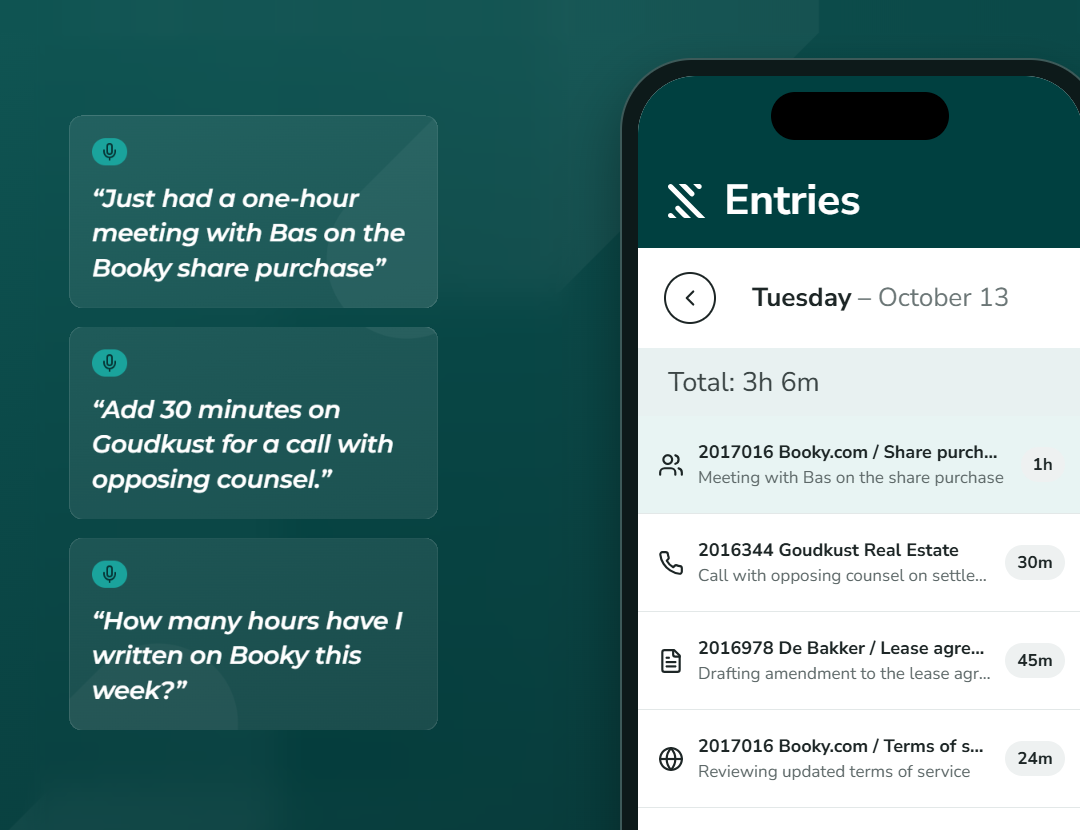
“Just had a one-hour meeting with Bas on the Booky share purchase.”
TIQ Time takes care of the rest, as if someone keeps your timesheet for you. It picks the right matter and activity, writes a clean narrative and adds the entry. No forms to fill in, and no reconstructing your day at 6 pm.
It works for any work you want to log on the go. And you can ask about your time the same way:
“Add 30 minutes on Goudkust for a call with opposing counsel.”
“How many hours have I written on the Booky matter this week?”
“What’s still unposted from last week? Post the entries that are complete.”
2. Work done inside your AI tool: it already knows
You did the work with AI. Now let it create the time entry. More and more legal work happens inside AI tools: reviewing contracts, doing research, drafting documents. The AI was there for all of it.
Say you just spent an hour reviewing a contract with your AI tool. Instead of opening your timesheet afterwards, type one more line in the same chat:
“Book the time on this contract review to Booky. Contract mark-up.”
The AI that helped you do the work also writes the entry. It already knows the matter and what you worked on, so the description is complete without you typing it out.
This also works across a longer session:
“Write a time entry for the research we just did on the Goudkust matter.”
“We worked on three matters in this chat today. Create an entry for each.”
Just finished a task in your favourite AI tool? Type one line and let TIQ Time create a time entry for it.
Why this matters for your firm
Firms are investing heavily in AI tools, and partners want to know what that investment delivers. The answer starts in the timesheet.
When work done with AI is recorded as time entries on the right matter, TIQ Time shows the firm exactly where AI is used: on which matters, for which work and by whom. That’s how you see what your AI investment really delivers.
And because TIQ Time works across Copilot, Claude, Harvey, Legora and other AI tools, you see it for all of them in one place, not just for one.
How it works
Behind the scenes, this runs through the TIQ Time MCP Server. It connects your timesheet to the AI tools you already use: Microsoft Copilot, Claude, Harvey, Legora and other AI tools that support it.





From your AI tool, you can
- Create time entries by voice or chat
- Check your hours on a matter, a day or a week
- Find time that hasn’t been posted yet
- Post your time when you’re ready
You stay in control. Every entry lands in TIQ Time, where you see it, adjust it if needed, and post it as usual.
Getting started
The TIQ Time MCP Server is available now. Already working with TIQ Time? Contact your TIQ contact to connect it to your firm’s AI tools. New to TIQ Time? Get in touch and we’ll show you how it works.
See it work on real data.
Book a 45-minute demo and watch TIQ Time complete a timesheet on real data.